Learn about Webel's comprehensive SysMLv2 Workshop Seminar course!
Webel now has a SysMLv2 Online Self-Study course with self-test Quizzes!
Learn about the Webel Q&A online self-testing system for SysML v2/v1

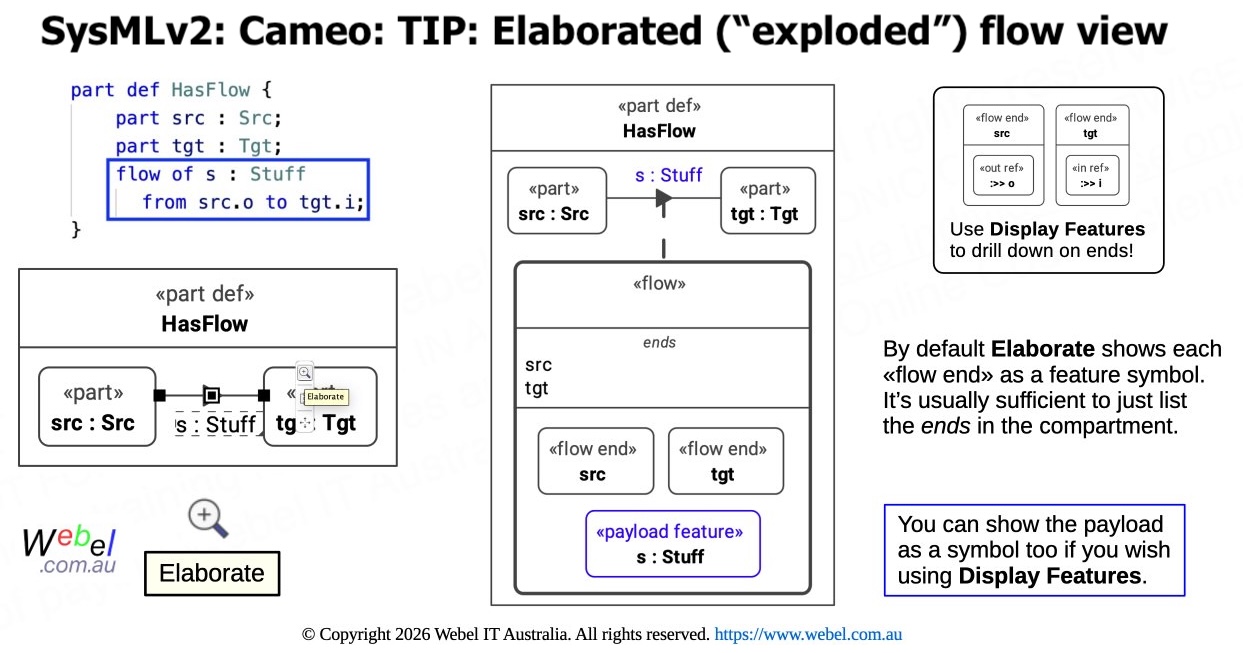
SysMLv2: Cameo: TIP: Use the Elaborate smart manipulator (little magnifying glass icon) on the symbol of any kind of connector (basic connector, flow, interface etc.) to show an "exploded" view of the connection usage.

Icon class
icon_class
far fa-sticky-note
icon_class_computed
far fa-sticky-note
Note kind
Policy level
Specification keywords
SysMLv2 keywords
Keywords
Click on the image to view it full size
The image shows a «flow» usage (which has some additional information compared with a basic connection), but the Elaborate feature works similarly for any kind of connection (including and interface usage). Visit also this TIP to learn more about displaying the additional underlying machinery of a «flow» usage:
Relates to
Related notes
Related notes (backlinks)
Related snippets (extracts)
Visit also
Visit also (backlinks)