

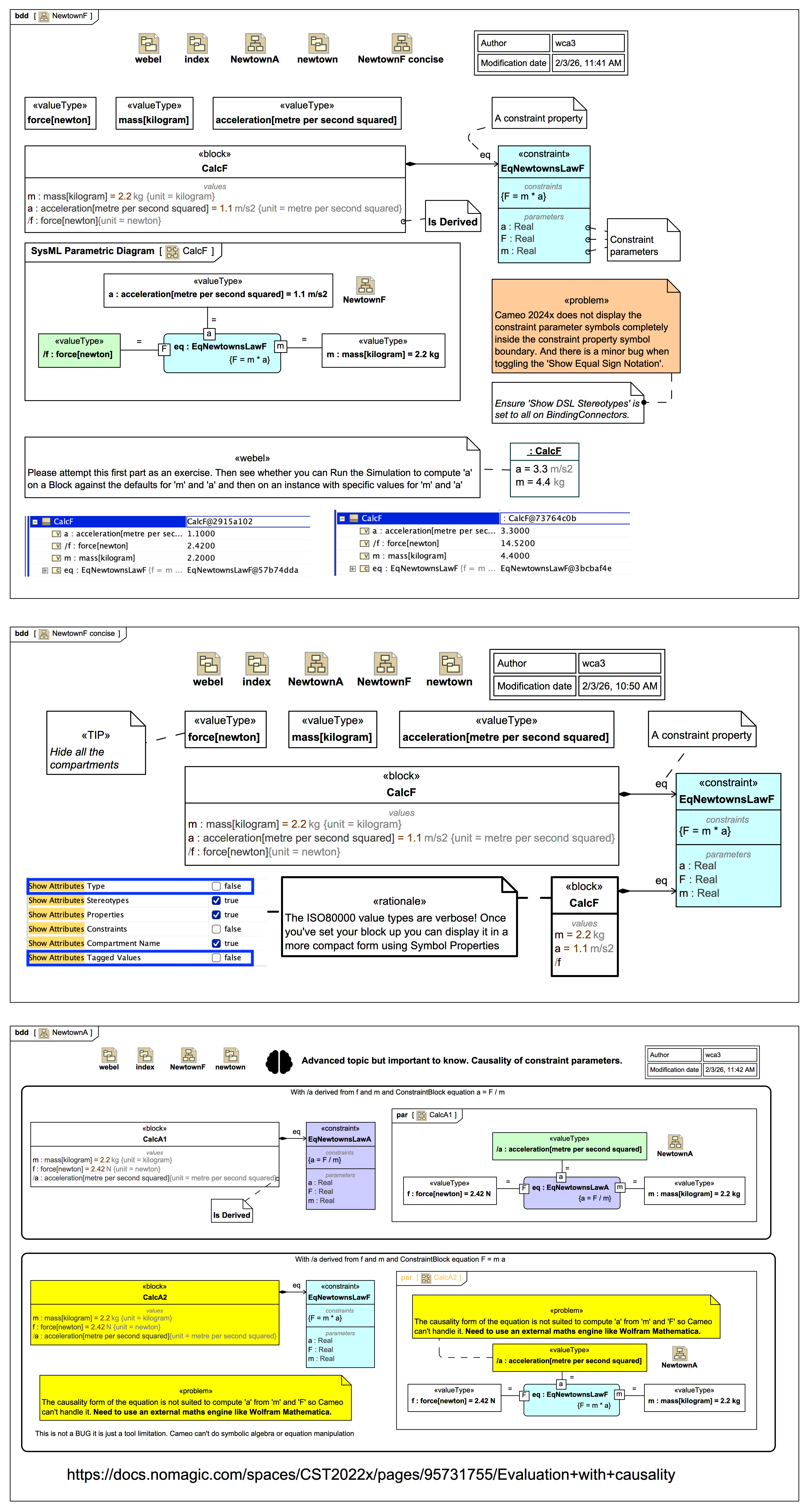
This composite image shows a very simple setup demonstrating a mathematical calculation using SysMLv1 Parametrics with a ConstraintBlock for Newton's Law F = m * a in Magic Model Analyst® (Cameo Simulation Toolkit®).
Note that typically SysMLv1 Parametrics involve multiple ConstraintBlock equations driven by a complex network of Blocks, and with the output(s) of constraint properties driving the input(s) of other constraint properties; in this very simple example a single block has two inputs (with default properties) and a single output value property.
The 1st composite image shows a SysMLv1 BDD and Parametric Diagram for the simplest case F = m * a where 'm' and 'a' are the inputs, provided either as default values on the value properties, or as more specific values on Slots of an instance. In this case, the causality is direct such that Magic Model Analyst® (Cameo Simulation Toolkit®) can use the constraint F = m * a to calculate the derived value /f
Note that the names of the driving and receiving value properties do not have to be identical to the names of constraint parameters; the ConstraintBlock captures a reusable equation to be used in various contexts. We could, for example, have driving values called 'carMass' and 'carAcceleration'.
The names of the ValueTypes for quantities in the ISO-80000 library are rather verbose, which makes them easier to search for but not so nice for display. The 2nd image shows how to hide the verbose type and tagged values info on a Block symbol. One can likewise hide most of the info on the constraint parameter symbols in a Parametric Diagram.
The 3rd image shows that Magic Model Analyst® (Cameo Simulation Toolkit®) can only handle equations with natural causality form. This is not a bug or issue, it just means that (if one can't restate the equation form with the desired causality such as in the a = F / m example ) one has to use an external maths engine like MATLAB or  Wolfram Mathematica. Cameo does not handle symbolic algebra and can't manipulate equations.